Shadow AI: How Can Companies Protect Against Unknown Uses?

Employees don’t always wait for their employers to approve new technology. This could be using a personal chatbot account to summarize a document, installing an AI browser extension, uploading information into an AI analysis tool or using an AI feature built into software without their employer knowing about it. This practice is often referred to as “shadow AI.”

Shadow AI is typically not malicious. Often, it’s the result of employees wanting to work more efficiently, or as a result of unclear AI use policies. However, shadow AI can create security and confidentiality issues. If employees send personal or company information into an AI system that has not been reviewed, the business may not have an accurate picture of where its information is going, how it’s being used, or for how long it is being stored. 

What does shadow AI look like?

Shadow AI could include any number of unapproved AI tools used for work purposes. For example, an employee may paste customer information into an LLM to create a summary, upload internal presentation information for editing or use an AI tool to analyze a spreadsheet. 

The problem is that using shadow AI can result in company information being sent to a third-party provider that the original company may not know about. By hiding in the “shadows,” employees who use AI tools in this way can create governance gaps. Without proper review of the AI tools being used by its employees, a company may not know what information is being provided, how long it will be retained for, who can access it or whether the vendor can use it for other purposes, like training its own systems. 

How can companies address employee AI usage?

Company AI policies can bring clarity to issues surrounding shadow AI. 

By addressing what kinds of technologies may be used, these policies can explain which AI tools are approved, what information employees may enter into those tools, and when a new AI tool or use requires review. In general, companies drafting these policies may want to specifically and clearly state what information may and may not be used. For example, a general policy telling employees to use AI responsibly may not provide enough guidance when someone is deciding whether to upload a confidential document or customer data into a new tool. 

These policies should also be communicated clearly. Without understanding the policies that a company has in place, employees may inadvertently engage in shadow AI use. With clarity on approved tools, uses, and inputs, an effective employee AI use policy could lower these risks. Within this policy, a company may may consider creating a process to request new AI tools. This way, relevant business teams can review any AI tools and uses before company information is provided.  

What should businesses take away?

Businesses do not necessarily need to prohibit AI use. However, companies may consider reviewing which tools employees are using and what information is being provided to them. Some steps companies may consider in this review process include, but are not limited to: 

  • Identifying AI tools employees are actually using, including personal accounts, browser extensions and AI features within existing software.
  • Explaining which tools are approved, restricted or prohibited and what information employees may enter.
  • Considering privacy, confidentiality, retention, deletion and AI-training terms with vendors.
  • Determining whether AI uses involve processing that requires a CCPA risk assessment or updates to privacy documentation.
  • Establishing rules preventing employees from providing sensitive company information to unapproved AI tools.
  • Giving employees a clear way to request new AI tools before using them for company work.

While AI in the workplace may boost efficiency, it may also create risk if the company is not aware of it. By providing employees with guidance on AI, businesses may be able to reduce the risks of shadow AI. 

AI Notetakers: Key Takeaways for Recording Calls

Use of AI notetakers is quickly becoming routine. These tools can automatically join video calls, listen to conversations, generate transcripts, create summaries, and identify key points in a meeting. 

While these tools have an argument for efficiency, they also create legal, privacy, and confidentiality risks. 

This issue is a lot more complicated than simply asking participants of a meeting for their consent to be “recorded.”  This is because recording, transcription, and AI processing are separate activities – and each may have its own notice and consent requirements.

As a result, businesses using these tools need to understand both what is happening during the meeting and what happens to the information after the meeting has ended.

What are AI notetakers?

An AI notetaker is a tool that captures meeting content and uses artificial intelligence to create transcriptions, summaries, action items, and log other important meeting records. Most operate as a bot that joins a video conference meeting as an additional participant. 

Many AI notetakers process information from meetings through cloud-based services rather than keeping the conversation only on an employee’s local computer. Depending on the provider, the service may receive audio transcripts and other meeting information and then use an AI system to analyze and summarize the dialogue. This means meeting content may be transferred outside of the company’s own system and processed or stored by a third-party provider, which may have privacy and data-sharing implications. 

Why do recording and consent laws matter?

Recording laws differ across the United States. Some states generally follow a one-party consent approach, meaning the consent of one participant is sufficient to record a conversation.  However, other states follow an all-party consent approach, sometimes referred to as “two-party consent” which generally requires the consent of everyone involved in a conversation for recording. The specific details and exceptions vary by jurisdiction

What actually counts as consent?

Sometimes consent can be more complicated than just simply displaying a recording symbol. Video-conference platforms may use different methods to alert participants when recording a meeting begins: a pop-up requiring participants to acknowledge the recording, an audible announcement, a banner or an icon that’s displayed during the meeting, some hosts may also require verbal consent.

But notice and consent are not always the same thing and what constitutes legally sufficient consent can depend on the applicable law and the circumstances at hand.

What happens to meeting information after the call?

Once an AI notetaker has captured a meeting, businesses should understand what rights the provider has over that information. Vendor terms can address data ownership, licensing, data retention, and whether information may be used to develop or improve the provider’s service. 

This becomes especially important as ordinary workplace conversations frequently include information that employees may not intentionally send to a third party: customer information, personnel issues, financial projections, internal strategy, product development and many other confidential materials may all be discussed while the AI notetaker captures the conversation. 

The transcription or summary can also create additional security concerns once the meeting ends. For example, automatically generated notes may be distributed via email, downloaded, forwarded and stored in employee accounts long after an original conversation has occurred. Meeting summaries create additional opportunities for sensitive information to spread or remain stored indefinitely. 

Businesses should therefore review not only what the tool captures but also who receives the resulting transcript, where it is stored, how long it is retained and who has the ability to delete it.

What about attorney-client privilege?

Adding an AI notetaker to a legal discussion can create questions about whether confidentiality has been maintained, and depending on the circumstances, whether privilege could be challenged or waived. You can read more updates from Federal District Courts on the issue here

This does not mean that all use of technology during a legal meeting automatically destroys attorney-client privilege. Whether privilege is affected may depend on the circumstances such as how the AI provider handles information and why the tool is being used. Therefore, businesses should be more cautious about allowing AI notetakers into meetings that involve legal advice or other professionally protected information. 

The same concern applies to trade secrets and other confidential business information. Meetings involving sensitive product plans or internal strategies and other proprietary information may not be appropriate for AI transcription unless the tool and its data practices have been reviewed carefully. 

What should businesses take away?

AI notetakers can be useful workplace tools, but businesses should have clear policies in place before employees begin using them regularly. Below are some high-level tips that businesses may want to consider when onboarding a new AI notetaker: 

  • Approve specific tools: Employees should know which AI notetakers are permitted and how those tools record, transcribe, store and process meeting information.
  • Create clear notice and consent procedures: Businesses may consider the laws that may apply to meeting participants and make sure notices accurately reflect how AI is being used.
  • Limit use in sensitive meetings: Legal, HR, disciplinary investigation and other confidential discussions may require additional approval or no AI notetaker at all.
  • Review vendor data practices: Companies should understand how meeting information is used, stored, retained and deleted, including whether it may be used to train or improve AI systems.
  • Set rules for transcripts and summaries: Businesses may want to determine who can access or share AI-generated notes, how long they are kept and whether they are treated as official company records.

Image of computer coding. Some of the coding is blurred.

THE CALIFORNIA AGE-APPROPRIATE DESIGN CODE

Image Credit: Markus Spiske from Unsplash

***Update: On September 15, 2022, Governor Newsom signed AB 2273, establishing the California Age-Appropriate Design Code Act.

Who It Covers, What It Requires & How It Compares to the UK

Effective July 1, 2024, the California Age-Appropriate Design Code imposes obligations on businesses[1] that provide an “online service, product, or feature” that is “likely to be accessed by children.”[2] Children are defined as California residents[3] “who are under 18 years of age.”[4] The law provides factors for whether an online service, product, or feature (S/P/F) is “likely to be accessed” by California residents under the age of 18:[5]

  • It is directed to children as defined by COPPA.[6]
  • It is determined, based on competent and reliable evidence regarding audience composition, to be routinely accessed by a significant number of children, or it is substantially similar to an online S/P/F that meets this factor.
  • It displays advertisements marketed to children.
  • It has design elements known to be of interest to children, including games, cartoons, music, and celebrities who appeal to children.
  • Based on internal research, a significant amount of the audience is children.

An online S/P/F is defined by what it is not, and the definition notably exempts the “delivery or use of a physical product.”[7] This exemption diverts from the UK version of the law, which covers “connected toys and devices.”[8]

Compared to the UK’s Common-Sense Approach

The US version of the law provides no guidance on what it means for a “significant number of children” to “routinely access[]” the online S/P/F. However, the law makes clear in its legislative findings that covered businesses may look to guidance and innovation in response to the UK version when developing US-covered online S/P/F.[9]

ICO states that the term “likely to be accessed by” is purposefully broad, covering “services that children [are] using in reality,” not just those services specifically targeting children.[10] However, ICO recognizes that the term is not so broad as to “cover all services that children could possibly access.”[11] The key difference is whether it is “more probable than not” that an online S/P/F will be accessed by children, and businesses should take a “common sense approach to this question.”[12]

To illustrate this point:

Read More
Map of the United States - State Privacy Laws

And Then There Were Five…

Image Credit: Free-Photos from Pixabay.

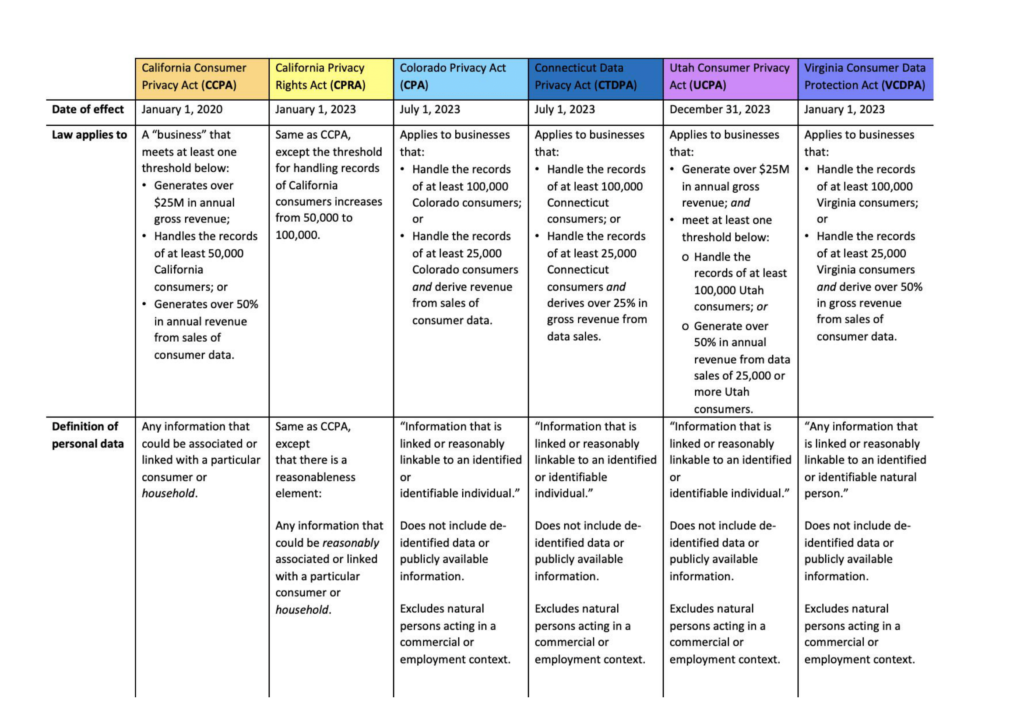
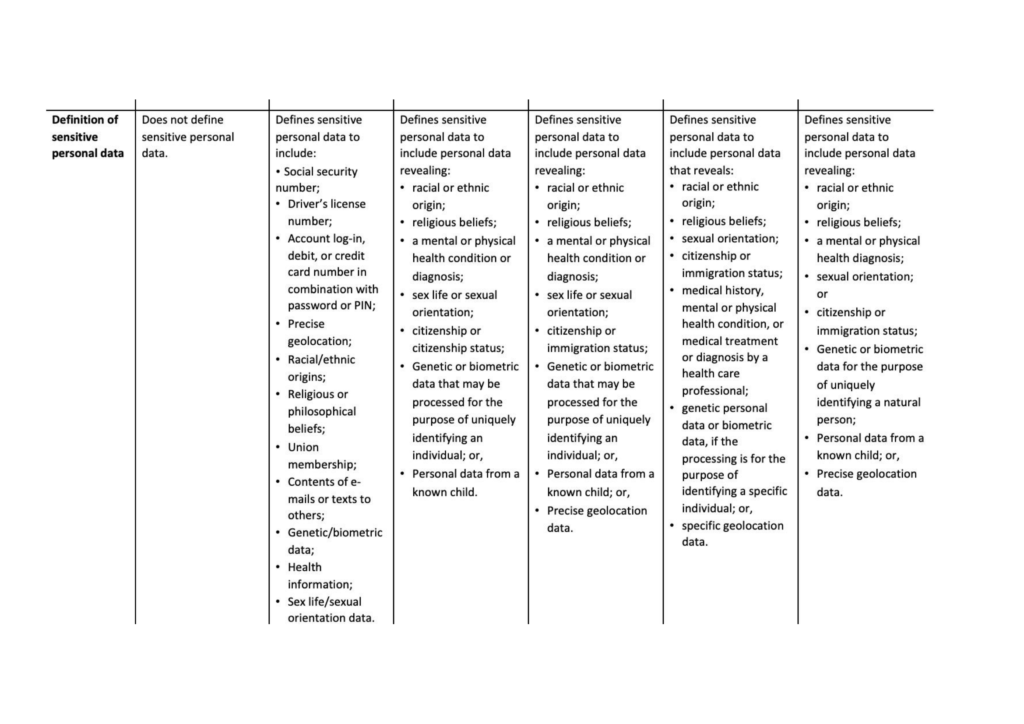
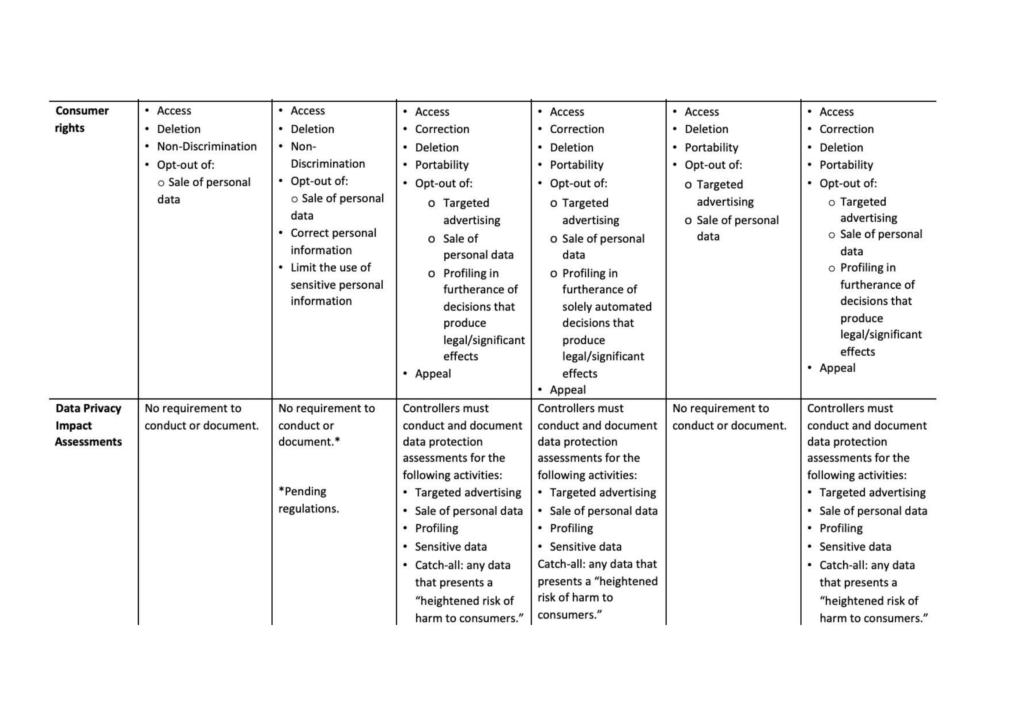
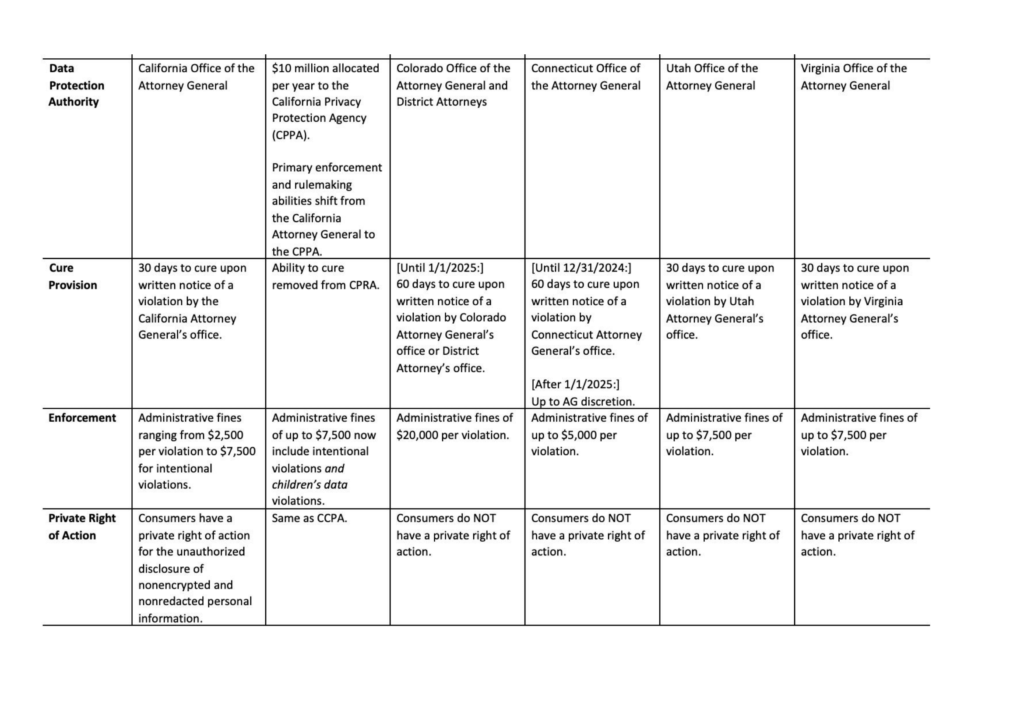
Just last summer, in July of 2021, Colorado joined California and Virginia, and became the third U.S. state with a comprehensive consumer privacy law. The Colorado Privacy Act is set to take effect in July 2023.

Hot on its heels, and within just two months of each other, first Utah in March of 2022, now Connecticut in May of 2022, passed privacy bills which will become effective in 2023.

So far, California remains the only state which allows for a private right of action in connection with its privacy bill. For more information, please see our comparison of the current U.S. state consumer privacy laws below.

For our unofficial redline of the CPRA, click here.

Follow these links for the official text of the CPRA, CPA, CTDPA, UCPA, and VCDPA.

To view and download a PDF version of this chart, click here.

Banner for PrivSec Global: A Global Live Stream Experience. 22-23 September 2021. The Largest Data Protection, Privacy and Security Event of 2021. Businesspeople smiling in the background of the banner.

Metaverse Law Speaks at PrivSec Global

On September 23, 2021 attorney Lily Li spoke at PrivSec Global: The Largest Data Protection, Privacy and Security Event of 2021. The Global Live Stream Experience was a two day event from September 22 to September 23, 2021.

The topic of discussion was “Why Most CCPA Cases Will Fail: Five Hurdles Plaintiffs Must Clear.” For more details on the topic and to watch the presentation on-demand, click here.

1 2 3